Group Nguyen Le
Group members
- Khai Nguyen
- Hoang Bach Nguyen
- Quynh Anh Le
Group Assignment: ESP-NOW Communication (ESP32 ↔ ESP32)
Objective
To demonstrate direct wireless communication between two microcontrollers without using WiFi routers or the internet, using the ESP-NOW protocol.
This extends our comparison by introducing a low-latency device-to-device architecture.
Concept Overview
1.ESP-NOW is a connectionless wireless protocol developed by Espressif that allows ESP32 devices to:
- Send data directly to each other
- Avoid WiFi network setup
- Achieve very fast communication (low latency)
2.ESP-NOW Architecture: Device-to-Device Communication
- Core mechanism:
MAC-Based Routing - Unlike standard Wi-Fi architectures that rely on IP addresses assigned by a central router, ESP-NOW operates on the data-link layer using
MAC (Media Access Control) addresses. Devices communicate directly by registering each other as "peers." Because it skips standard Wi-Fi handshakes (network scanning, authentication, and IP assignment), the connection latency is incredibly low (often around a millisecond).
3.The roles of sending and receiving: In an ESP-NOW architecture, devices do not act as traditional servers or clients. Instead, they operate as Initiators and Responders.
The Initiator (Sender):
- Responsibility: Initiates the transmission of a data packet (up to 250 bytes maximum).
- How it works: The sender must know the exact MAC address of the receiving ESP32 and be operating on the same Wi-Fi channel. It adds that MAC address to its internal list, which keeps track of all other peers’ addresses.
- Confirmation: Once a message is dispatched, this callback automatically triggers and reports whether the delivery to the MAC address was successful or if it failed.
The Responder (Receiver):
- Responsibility: Passively listens for incoming ESP-NOW action frames on the designated 2.4 GHz channel.
- How it works: It does not strictly need to know the sender's MAC address in advance just to listen. The moment a packet arrives, the callback function wakes up, captures the incoming payload, and reads the sender's MAC address so the microcontroller can process the data.
For this assignment, we chose the Point-to-Point architectural topology, where a single sender communicates directly with a single receiver.
System Architecture
ESP-NOW enables direct MAC addresses between their ESP32 devices, without requiring a WiFi network or internet connection.
Using the Slave - Master architecture, the sender (master) initiates communication by sending data to the receiver (slave). The receiver just listens for incoming messages.
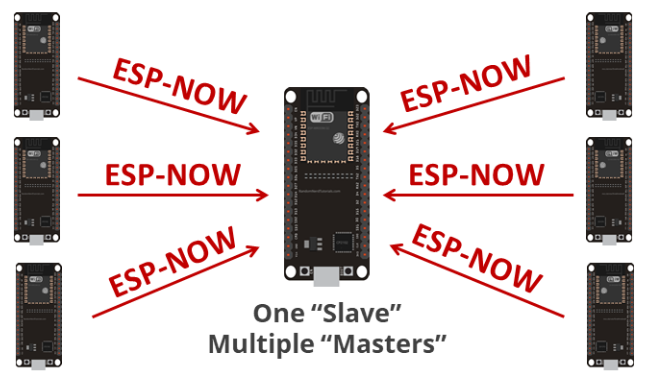
Architecture Flow
1. Initialization: Connect 2 ESP32 devices together, here 2 ESP32’s start in station mode and activate ESP-NOW protocol automatically.
WiFi.mode(WIFI_STA);
esp_now_init();
2. MAC address registration: After running the init(), the Sender ESP32 registers the MAC address of the Receiver. This step does not need the IP of the other ESP32 device.
3. Data Transmission: Sender’s data/message is structured into a small packet (max ~250 bytes).to ensure low latency. Also because of the underlying WiFi protocol of the ESP itself.
4. Sending Data: Sender transmits using:
esp_now_send(receiverMAC, (uint8_t *)&msg, sizeof(msg));
Data is embedded into a WiFi action frame and sent wirelessly.
5. Data Transmission: Data travels directly over 2.4 GHz radio, The receiver lisens for the incoming packet.
6. Receiving Data: When the receiver gets the packet, it triggers a callback function:
esp_now_register_recv_cb(onReceive);
Triggered automatically when data arrives (event-driven).
Hardware Setup
Sender:
- ESP32 (XIAO ESP32C3 or ESP32)
- Push button (optional)
Receiver:
- ESP32
- LED (built-in or external)
Implementation
One of the ways to get the Master - Slave examples between 2 ESP32 device is thorugh the Example code provided by the base ESP32 Board, by Espressif in the Arduino IDE.
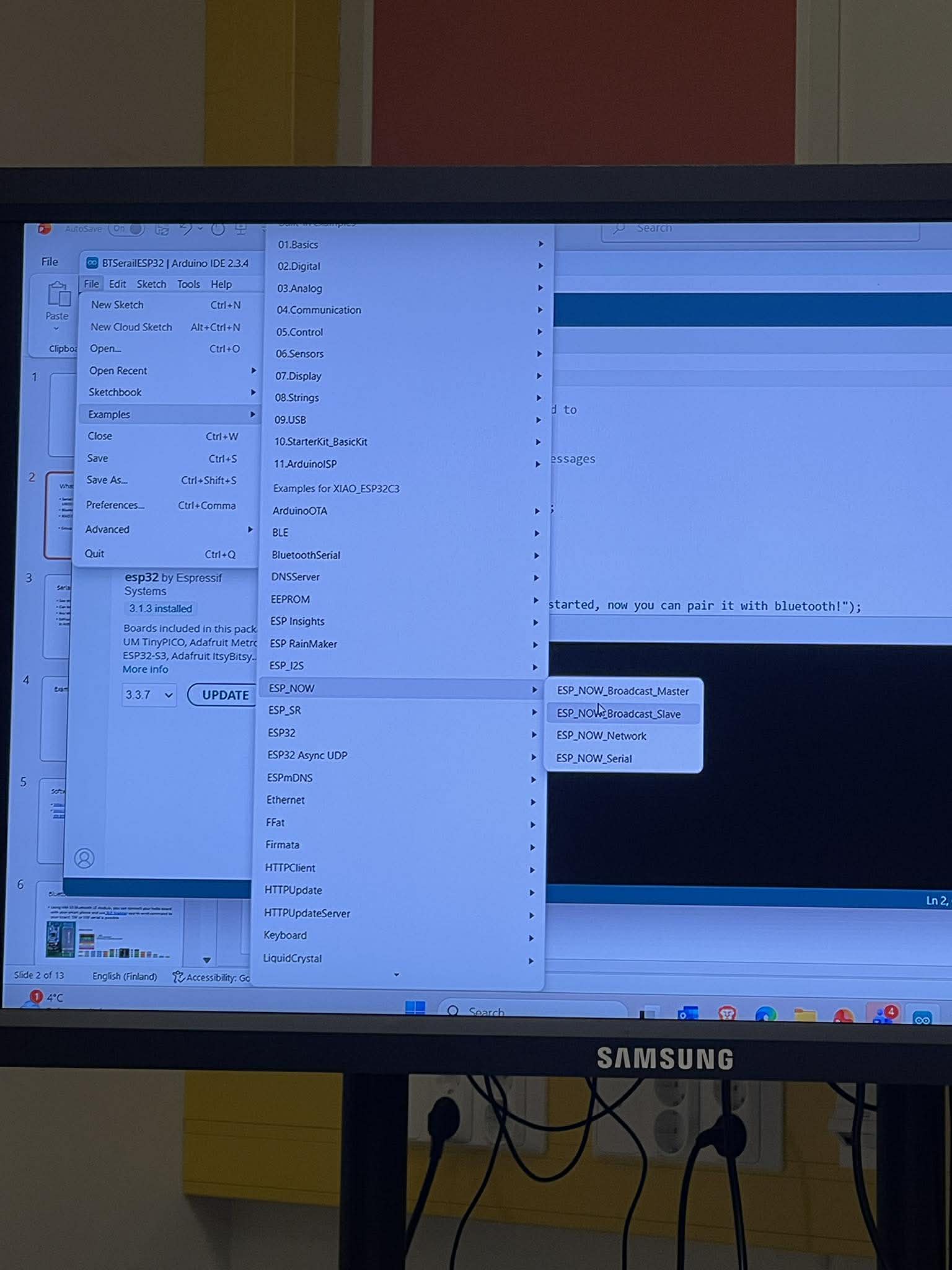
1.Get Receiver MAC Address
Purpose: Every ESP32 has a unique hardware identifier called a MAC address. The sender needs this address to know exactly which device to send data to.
#include <WiFi.h>     // Include WiFi library - needed for MAC address functions

void setup() {
  Serial.begin(115200);           // Start serial communication at 115200 baud
  WiFi.mode(WIFI_STA);            // Set WiFi to Station mode (client mode, not access point)
  Serial.println(WiFi.macAddress()); // Print the device's unique MAC address to Serial Monitor
}

void loop() {}                    // Nothing needed in loop - we only need the MAC once
How it works:
- WiFi.mode(WIFI_STA) puts the ESP32 in Station mode, which is required to read the MAC address
- WiFi.macAddress() returns a string like "24:6F:28:AB:CD:EF"
- Copy this address exactly as it appears in the Serial Monitor
Upload this code to the receiver ESP32 and copy the MAC address from Serial Monitor.
2.Sender Code
Purpose: The sender ESP32 reads a button (or sends a signal) and transmits data directly to the receiver's MAC address using ESP-NOW.
#include <esp_now.h>   // ESP-NOW protocol library - handles direct device communication
#include <WiFi.h>      // WiFi library - needed for basic WiFi setup

// Replace these 6 bytes with the MAC address you copied from the receiver
// Format: {0xXX, 0xXX, 0xXX, 0xXX, 0xXX, 0xXX}
uint8_t receiverMAC[] = {0x24, 0x6F, 0x28, 0xXX, 0xXX, 0xXX};

// Define a structured message type for sending data
// Using a struct makes it easy to send multiple values (e.g., sensor readings)
typedef struct {
  int value;          // Simple integer value - can be 0 (OFF) or 1 (ON)
} Message;

Message msg;          // Create an instance of the Message structure

void setup() {
  Serial.begin(115200);           // Start serial for debugging
  WiFi.mode(WIFI_STA);            // Set WiFi to Station mode (required for ESP-NOW)

  // Initialize ESP-NOW protocol
  // Returns ESP_OK (0) if successful, otherwise error code
  if (esp_now_init() != ESP_OK) {
    Serial.println("Error initializing ESP-NOW");
    return;                       // Stop execution if initialization fails
  }

  // Configure peer (receiver) information
  esp_now_peer_info_t peerInfo;   // Structure that holds peer device information

  // Copy the receiver's MAC address into the peer info structure
  // memcpy(destination, source, number_of_bytes)
  memcpy(peerInfo.peer_addr, receiverMAC, 6);

  peerInfo.channel = 0;           // 0 = use current WiFi channel
  peerInfo.encrypt = false;       // No encryption for simplicity

  // Add the receiver as a trusted peer
  // After this, the sender is allowed to transmit to this MAC address
  esp_now_add_peer(&peerInfo);
}

void loop() {
  // Prepare the message to send
  msg.value = 1;                  // Set value to 1 (meaning LED ON)

  // Send the data to the receiver
  // Parameters:
  //   1. receiverMAC - destination address
  //   2. &msg - pointer to our data (cast to uint8_t* for byte-level sending)
  //   3. sizeof(msg) - number of bytes to send
  esp_now_send(receiverMAC, (uint8_t *)&msg, sizeof(msg));

  delay(2000);                    // Wait 2 seconds before sending again
}
Key Concepts in Sender Code:
| Concept | Explanation |
|---|---|
| esp_now_init() | Initializes the ESP-NOW protocol. Must be called before any other ESP-NOW functions. |
| esp_now_peer_info_t | Structure that stores information about a peer device (MAC address, channel, encryption). |
| esp_now_add_peer() | Registers a device as a trusted peer. The sender can only send to registered peers. |
| esp_now_send() | Transmits data to a specific MAC address. Data is sent as raw bytes. |
| typedef struct | Defines a custom data structure. Makes it easy to send multiple values (e.g., {int x; int y; float z;}). |
3.Receiver Code
Purpose: The receiver ESP32 listens for incoming ESP-NOW messages. When a message arrives, it reads the data and controls the LED accordingly.
#include <esp_now.h>   // ESP-NOW protocol library
#include <WiFi.h>      // WiFi library - required for ESP-NOW to work

// Define the same message structure used by the sender
// Must match exactly for proper data decoding
typedef struct {
  int value;          // Will receive 0 (OFF) or 1 (ON)
} Message;

Message incoming;     // Variable to store received data

// Callback function - automatically called when a new ESP-NOW packet arrives
// Parameters:
//   mac - MAC address of the sender (6 bytes)
//   data - pointer to the received data bytes
//   len - number of bytes received
void onReceive(const uint8_t * mac, const uint8_t *data, int len) {

  // Copy the raw received data into our Message structure
  // memcpy(destination, source, number_of_bytes)
  memcpy(&incoming, data, sizeof(incoming));

  // Check the received value and control the LED
  if (incoming.value == 1) {
    digitalWrite(LED_BUILTIN, HIGH);   // Turn LED ON
  } else {
    digitalWrite(LED_BUILTIN, LOW);    // Turn LED OFF
  }
}

void setup() {
  Serial.begin(115200);               // Start serial for debugging

  // Configure the built-in LED pin as an output
  pinMode(LED_BUILTIN, OUTPUT);
  digitalWrite(LED_BUILTIN, LOW);     // Start with LED OFF

  WiFi.mode(WIFI_STA);                // Set WiFi to Station mode (required)

  // Initialize ESP-NOW protocol
  esp_now_init();                     // No error checking for simplicity

  // Register the receive callback function
  // This tells ESP-NOW to call onReceive() whenever data arrives
  esp_now_register_recv_cb(onReceive);
}

void loop() {
  // Nothing needed here - all work happens in the callback
  // The ESP32 can sleep or do other tasks while waiting for messages
}
Example Receiver code from the Serial Monitor:
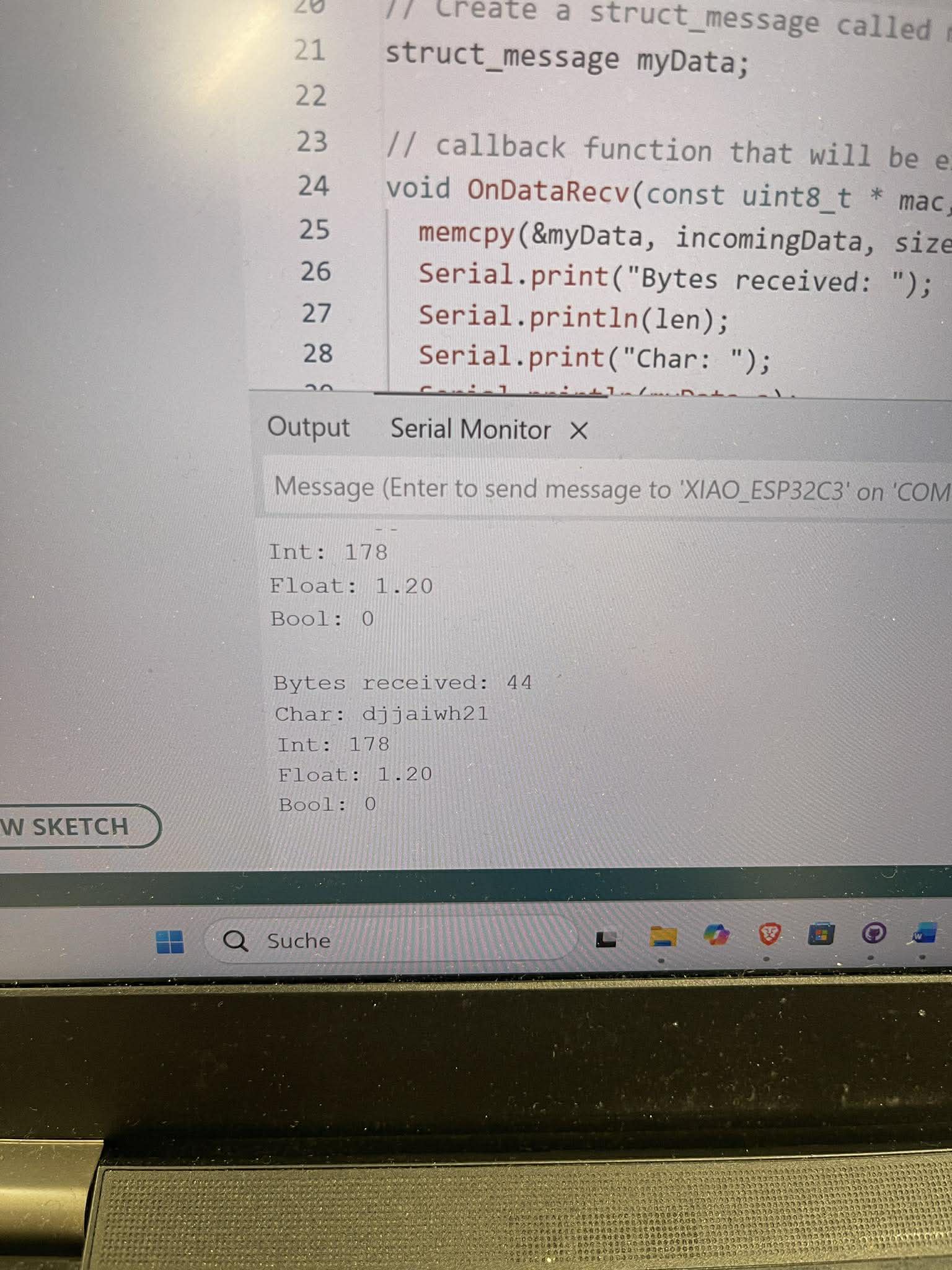
Key Concepts in Receiver Code:
| Concept | Explanation |
|---|---|
| esp_now_register_recv_cb() | Registers a callback function that triggers automatically when data arrives. This is an interrupt-driven approach - the CPU doesn't waste time polling. |
| Callback Function | A function that the system calls automatically when an event occurs. Here, onReceive() runs whenever an ESP-NOW packet is received. |
| const uint8_t * mac | Pointer to the sender's MAC address (6 bytes). Useful if you want to identify which device sent the message. |
| esp_now_send() | Transmits data to a specific MAC address. Data is sent as raw bytes. |
| memcpy() | Copies raw memory from source to destination. Essential for reconstructing structured data from raw byte streams. |
Key Learnings
- Protocol Design: ESP-NOW enables direct peer-to-peer communication
- Low Latency: Faster than HTTP/WiFi-based communication
- No Router Needed: Works offline
- MAC Addressing: Devices communicate using unique hardware addresses